
Fall Semester, 2005
Python Basics
© 2005 All Rights Reserved, SDSU & Roger Whitney
San Diego State University -- This page last updated September 1, 2005
|
|
Emerging Technologies
Fall Semester, 2005 Python Basics |
|
|---|---|---|
|
© 2005 All Rights Reserved, SDSU & Roger Whitney San Diego State University -- This page last updated September 1, 2005 |
CS 683 Emerging Technologies
Fall Semester, 2005
Doc 1 Python Basics
Contents
Copyright ©, All rights reserved. 2005 SDSU & Roger Whitney, 5500 Campanile Drive, San Diego, CA 92182-7700 USA. OpenContent ( http://www.opencontent.org/opl.shtml ) license defines the copyright on this document.
| CS683 Fall 2005 | Doc 1, Python Basics Slide # 2 |
References
Python Tutorial, Guido van Rossum, http://www.python.org/doc/current/tut/tut.html
Python Reference Manual, Guido van Rossum, http://docs.python.org/ref/ref.html
Python Library Reference, Guido van Rossum, http://docs.python.org/lib/lib.html
Learning Python, Lutz & Ascher, O'Reilly, 1999
| CS683 Fall 2005 | Doc 1, Python Basics Slide # 3 |
Sept 6. Chapters 1-4 of the Python Tutorial
Sept 8. Chapters 5-8 of the Python Tutorial
Sept 13. Chapters 9-11 of the Python Tutorial
| CS683 Fall 2005 | Doc 1, Python Basics Slide # 4 |
Some Useful Python Web Sites
Main Python Site
Beginner's Guide to Python
http://wiki.python.org/moin/BeginnersGuide
Beginner's Download Guide
http://wiki.python.org/moin/BeginnersGuide/Download
General Download Guide
http://www.python.org/download/
How to run a Python program under Windows
http://www.python.org/doc/faq/windows.html#how-do-i-run-a-python-program-under-windows
List of Python Introductions
http://www.python.org/doc/Intros.html
Python Tutorial, Guido van Rossum,
http://www.python.org/doc/current/tut/tut.html
Dive Into Python, Mark Pilgrim, online Book
comp.lang.python, python news group
http://groups.google.com/group/comp.lang.python
| CS683 Fall 2005 | Doc 1, Python Basics Slide # 5 |
Interpreter
Script file
Compiled code
Application
Interpreter
Al 11-> python
Python 2.3.5 (#1, Mar 20 2005, 20:38:20)
[GCC 3.3 20030304 (Apple Computer, Inc. build 1809)] on darwin
Type "help", "copyright", "credits" or "license" for more information.
>>> 1 + 2
3
>>>
Instructions for Windows machines
| CS683 Fall 2005 | Doc 1, Python Basics Slide # 6 |
Script File
Unix Example
File name: helloWorld.py
#! /usr/bin/env python
print 'Hello World'
Make the file executable:
Al 45->chmod u+x helloWorld.py
Run the file
Al 46->helloWorld.py
Note details may differ between Unix machines
Instructions for Windows machines
| CS683 Fall 2005 | Doc 1, Python Basics Slide # 7 |
|
Literals |
Description |
|---|---|
|
123, -34, 0 |
Integer (C long) |
|
2323232323232L |
Long Integer (unlimited size) |
|
1.23, 3.14e-10, 4E21, 5.3e+43 |
Floating-point (C double) |
|
052, 0x4da |
Octal & Hex |
|
2+5j, 7.2-8j, 2J |
Complex number |
>>> a = 5
>>> b =2
>>> a * b
10
>>> a / 3
1
>>> a / 3.0
1.6666666666666667
>>> c = 3 + 2j
>>> a + c
(8+2j)
>>> abs(-5)
5
| CS683 Fall 2005 | Doc 1, Python Basics Slide # 8 |
Numeric Operations
For more information see:
| CS683 Fall 2005 | Doc 1, Python Basics Slide # 9 |
Variable Names
Case sen sitive
Must start with underscore or letter
May contain letters, digits or underscores cat_3
Can not use reserved words
Reserved Words
|
and |
del |
for |
is |
raise |
|
assert |
elif |
from |
lambda |
return |
|
break |
else |
global |
not |
try |
|
class |
except |
if |
or |
while |
|
continue |
exec |
import |
pass |
yield |
|
def |
finally |
in |
|
| CS683 Fall 2005 | Doc 1, Python Basics Slide # 10 |
Operator Precedence
|
Operators |
Description |
|---|---|
|
x or y |
Lazy logical or |
|
x and y |
Lazy logical and |
|
not x |
logical negation |
|
<, <=, >, >=, ==, <>, !>, is, is not, in, not in |
Comparison, identity tests, sequence membership |
|
X | y |
Bitwise or |
|
x ^ y |
Bitwise exclusive or |
|
x & y |
Bitwise and |
|
x<<y, x>>y |
Shift x left(right) by y bits |
|
x+y, x-y |
Addition/Concatenation, subtraction |
|
x*y, x/y, x%y |
Mult/repetition, division, remander/format |
|
-x, +x, ~x |
Negation, identity, bitwise complement |
|
x[k], x[i:j], x.y, x(...) |
Indexing, slicing, qualification, functions call |
|
(...), [...], {...}, `...` |
Tuple, list, dictionary, conversion to string |
| CS683 Fall 2005 | Doc 1, Python Basics Slide # 11 |
Immutable - once create can not change
aString = 'Cat in the hat' #a Comment
bString = "Cat in the hat"
multiLineString = """Cat in
the
hat"""
>>> a = 'cat'
>>> b = 'dog'
>>> a + b
'catdog'
>>> a * 3
'catcatcat'
>>> a[0]
'c'
>>> a[1]
'a'
>>> len(a)
3
>>> a[-1] #a[len(a) - 1] that is index from end
't'
>>> 'a' in a
True
>>> 'a' not in b
True
>>> min(a) #min element in a
'a'
>>> max(b)
'o'
| CS683 Fall 2005 | Doc 1, Python Basics Slide # 12 |
Slicing
>>> six = '012345'
>>> len(six)
6
>>> six[2:4] #from index 2 up to index 4
'23'
>>> six[:4] #from start up to index 4
'0123'
>>> six[3:] #from index 3 to end
'345'
>>> six[:] #Make a copy - from start to end
'012345'
>>> six[1:5:2] #from index 1 up to 5 step 2
'13'
| CS683 Fall 2005 | Doc 1, Python Basics Slide # 13 |
Formatting
like springf in C
>>> template = 'We have %d too many %s'
>>> template % (10, 'crashers')
'We have 10 too many crashers'
>>> template % (5, 'hurricanes')
'We have 5 too many hurricanes'
| CS683 Fall 2005 | Doc 1, Python Basics Slide # 14 |
String methods
>>> string.capitalize()
'This is an example'
>>> string.split()
['this', 'is', 'an', 'example']
>>> string.split('i')
['th', 's ', 's an example']
>>> string.split('ia')
['this is an example']
>>> string.split('an')
['this is ', ' example']
| CS683 Fall 2005 | Doc 1, Python Basics Slide # 15 |
Iterating Strings
for variableName in aString:
>>> a = 'c1t2'
>>> for c in a:
... if c.isdigit(): print c
...
1
2
| CS683 Fall 2005 | Doc 1, Python Basics Slide # 16 |
Mutable ordered collection
>>> aList = ['cat', 'dog', 3, 'mouse']
>>> aList[2]
3
>>> aList[1:3]
['dog', 3]
>>> aList.sort()
>>> aList
[3, 'cat', 'dog', 'mouse']
>>> aList[0] = 'tea'
>>> aList
['tea', 'cat', 'dog', 'mouse']
>>> aList.append('trap')
>>> aList
['tea', 'cat', 'dog', 'mouse', 'trap']
>>> del aList[1]
>>> aList
['tea', 'dog', 'mouse', 'trap']
>>> del aList[1:3]
>>> aList
['tea', 'trap']
| CS683 Fall 2005 | Doc 1, Python Basics Slide # 17 |
Nesting Lists
>>> a = ['cat', 'dog']
>>> b = [1, a, 2]
>>> b
[1, ['cat', 'dog'], 2]
>>> len(b)
3
>>> b[1]
['cat', 'dog']
>>> b[1][0]
'cat'
>>> b[1][0] = 'new'
>>> b
[1, ['new', 'dog'], 2]
>>> a
['new', 'dog']
| CS683 Fall 2005 | Doc 1, Python Basics Slide # 18 |
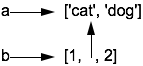
Assignments Create References
>>> a = ['cat', 'dog']
>>> b = [1, a, 2]
| CS683 Fall 2005 | Doc 1, Python Basics Slide # 19 |
Immutable ordered collection
Immutable list
>>> aTuple = ('cat', 'dog', 'mouse')
>>> aTuple[2]
'mouse'
>>> for item in aTuple:
... print item
...
cat
dog
mouse
>>> aTuple[1:2]
('dog',)
>>> tupleAlso = 1, 2, 3
>>> tupleAlso
(1, 2, 3)
>>> emptyTuple = ()
>>> aTuple[1] = 5
Traceback (most recent call last):
File "<stdin>", line 1, in ?
TypeError: object doesn't support item assignment
del and append are also illegal
| CS683 Fall 2005 | Doc 1, Python Basics Slide # 20 |
String
Unicode String
List
Tuple
Buffer
Xrange objects
| CS683 Fall 2005 | Doc 1, Python Basics Slide # 21 |
Mutable map (or hashtable)
Keys must be immutable
>>> offices = { 'whitney': 'GMCS 561', 'beck':'GMCS-407B' }
>>> offices['whitney']
'GMCS 561'
>>> offices.keys()
['beck', 'whitney']
>>> offices.values()
['GMCS-407B', 'GMCS 561']
>>> offices.has_key(' lewis ')
False
>>> offices['lewis'] = 'GMCS-544'
>>> offices.has_key('lewis')
True
>>> offices.has_key('Lewis')
False
>>> del offices['whitney']
>>> offices.keys()
['beck', 'lewis']
| CS683 Fall 2005 | Doc 1, Python Basics Slide # 22 |
Long Lines
Use a "\" to continue code on the next line
if 1900 < year < 2100 and 1 <= month <= 12 \
and 1 <= day <= 31 and 0 <= hour < 24 \
and 0 <= minute < 60 and 0 <= second < 60: #Valid date
return 1
Inside [], () and {} don't need the backslashes
month_names = ['Januari', 'Februari', 'Maart',
'April', 'Mei', 'Juni', #Dutch names
'Juli', 'Augustus', 'September',
'Oktober', 'November', 'December']
| CS683 Fall 2005 | Doc 1, Python Basics Slide # 23 |
>>> sampleFile = open('test', 'w')
>>> sampleFile.write('This is a test\n')
>>> shopingList = 'bread' , 'cheese', 'lentils'
>>> shopingList
('bread', 'cheese', 'lentils')
>>> sampleFile.writelines(shopingList)
>>> sampleFile.writelines(shopingList)
>>> sampleFile.close()
>>> sampleFile = open('test', 'r')
>>> sampleFile.readline()
'This is a test\n'
>>> sampleFile.readline()
'breadcheeselentilsbreadcheeselentils'
>>> sampleFile = open('test', 'r')
>>> sampleFile.readline()
'This is a test\n'
>>> sampleFile.readlines()
['breadcheeselentilsbreadcheeselentils']
File modes: 'r', 'w', 'a' (append)
| CS683 Fall 2005 | Doc 1, Python Basics Slide # 24 |
a is b
Do a & b point to same object
a == b
Do a & b have point to objects that have same structure and value
>>> a = [1, ('cat', 3)]
>>> b = [1, ('cat', 3)]
>>> c = a
>>> a == b, a is b, a == c, a is c
(True, False, True, True)
| CS683 Fall 2005 | Doc 1, Python Basics Slide # 25 |
Comparing
>>> a = [1, ('cat', 3)]
>>> d = [1, ('cat', 4)]
>>> a < d, a == d, a > d
(True, False, False)
>>> {1:1, 2:2} < {1:2, 2:1}, {1:1, 2:2} > {1:2, 2:1}
(True, False)
23 < 'cat' , 23 == 'cat', 23 > 'cat'
(True, False, False)
>>> 23 < [1, 'cat']
True
>>> ['cat'] < ('cat'), ['cat'] == ('cat'), ['cat'] > ('cat')
(True, False, False)
Numbers are compared as number
String are compared lexicographically
Lists & tuples are compared by comparing each component, from left to right
Dictionaries are compared as sorted (key, value) lists
Can comparing different types, but results can be meaningless
| CS683 Fall 2005 | Doc 1, Python Basics Slide # 26 |
Language defines boolean types
True
False
However other values can be evaluated as boolean
>>> if 'cat': print 'hi'
...
hi
Values equivalent to False
None
Numeric zero of all types
Empty sequences: '' [] ()
Empty mappings: {}
All other values are interpreted as True
Copyright ©, All rights reserved.
2005 SDSU & Roger Whitney, 5500 Campanile Drive, San Diego, CA 92182-7700 USA.
OpenContent license defines the copyright on this document.